

Screw Air Compressor Cooling Fan Failure: Signs to Look For
Quick Answer
A faulty cooling fan on a screw air compressor can often be identified by the following signs: the fan runs continuously with a loud whistling noise or other unusual noise, accompanied by an automatic emergency shutdown and a High Temperature fault alarm; or, conversely, the fan does not rotate at all even when cooling is required.
However, machine overheating does not necessarily mean that the fan has failed. A dirty cooler, poor compressor room ventilation, high ambient temperature, low oil level, or deteriorated oil can also cause similar symptoms.
To determine whether the cooling fan is actually malfunctioning, inspect the fan's operating status, fan motor, power supply, protection devices, airflow, and machine temperature data. Fan construction and control methods may vary by model, so consult the technical documentation for the specific machine.
1. What Is the Role of the Cooling Fan in a Screw Air Compressor?
In screw air compressors that use an air-cooled system, the fan generates airflow through the heat exchange area to remove heat from the machine.
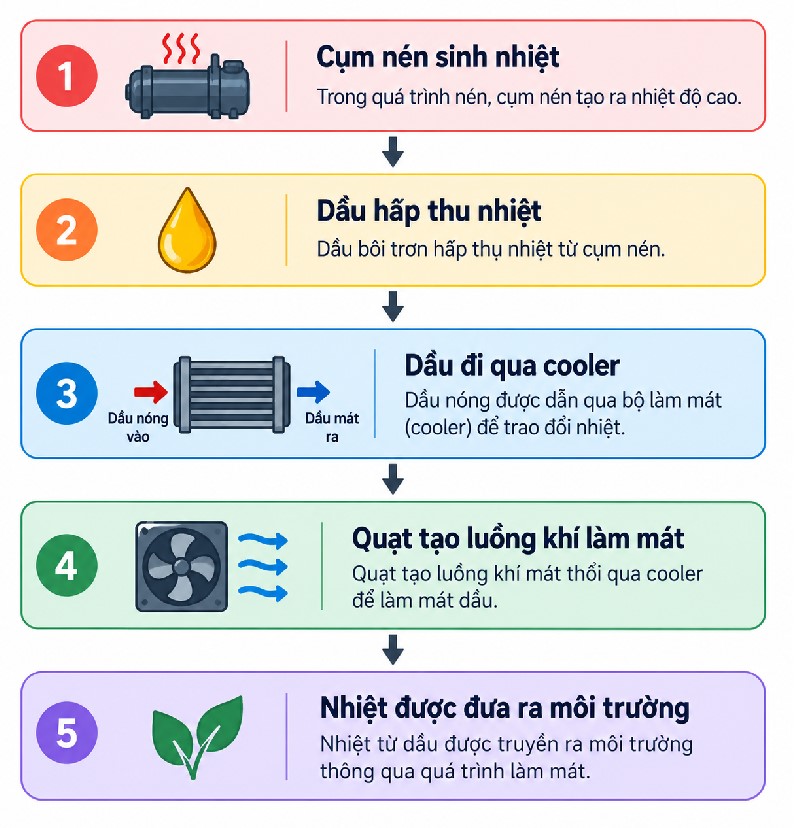
If the fan is not operating or the cooling airflow is insufficient, the system's heat-dissipation capacity may decrease. According to common operating documentation from screw air compressor manufacturers, cooling fan malfunction is frequently listed alongside a dirty cooler, poor ventilation, high ambient temperature, low oil level, and poor oil condition as a potential cause of high Airend temperature.
2. Six Signs of a Problem with a Screw Air Compressor Cooling Fan
1. The Fan Runs Continuously with a Loud Whistling Noise or Other Unusual Noise
This is one of the easiest signs to recognize by ear during actual operation. The fan runs continuously without stopping and produces a loud whistling noise or sounds noticeably different from normal operation. This may coincide with the machine suddenly shutting down and displaying a high-temperature fault code. Such symptoms indicate that the cooling system may be working under strain but still failing to meet the required heat-dissipation demand. The system should be inspected immediately.
2. The Fan Does Not Rotate When Cooling Is Required
If the machine's design requires the fan to operate but it does not rotate at all, check the fan motor power supply, fan motor protection devices, electrical wiring and connections, fan motor, control signals, and the controller's conditions for enabling fan operation.
Do not conclude immediately that the fan motor has burned out simply because the fan is not rotating. The cause may lie in the control circuit or protection system.
3. The Machine Triggers a High-Temperature Alarm
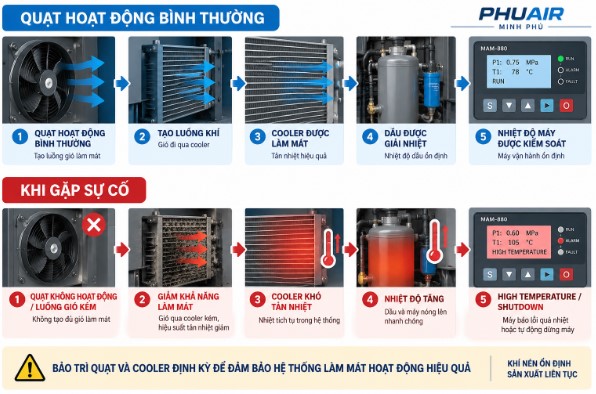
Fan problem → reduced cooling capacity → rising operating temperature → high-temperature alarm from the controller.
Depending on the model, the controller may display an alarm related to High Temperature, High Element Outlet Temperature, or a dedicated fan-related fault code. A high Airend outlet temperature alarm may be associated with a cooling fan malfunction. When this alarm occurs, check both fan operation and the entire cooling system.
Specific alarm temperature thresholds vary by manufacturer and model. Consult the operating documentation for the actual machine rather than applying a single universal value.
Remember: an overheating machine does not necessarily mean the fan is faulty. The cooler, ventilation, oil, and other components must also be checked (see the section “Is a Faulty Fan the Only Cause?” below).
4. The Fan Produces Unusual Noise or Vibration
A normally operating fan generally produces relatively consistent noise. If unusual sounds, abnormal rattling, rubbing noises, strong vibration, clattering, or unstable rotational speed occur, the fan should be inspected promptly. Possible causes include damaged fan blades, obstructions, fan motor problems, bearings (depending on the design), or loose mechanical connections.
Avoid prolonged operation when the fan shows abnormal mechanical symptoms, as a minor fault may develop into more serious damage.
5. The Fan Is Still Rotating but the Machine Temperature Continues to Rise
This situation is easy to misdiagnose. An operator sees that the fan is rotating and assumes that it must be functioning properly, but this is not necessarily true. Check whether airflow is sufficient. Possible causes include dust or oil buildup on the cooler, damaged fan blades, an incorrect airflow direction, an excessively hot compressor room, or hot air being drawn back into the system through recirculation. When the Airend temperature is high, inspect restrictions in cooling airflow, compressor room ventilation, and hot-air recirculation, in addition to checking the fan and cooler.
6. The Fan Trips Its Protection Device or Triggers a Fan Motor Overload Alarm
Some systems have dedicated protection for the fan motor. In the event of an overload, electrical fault, mechanical obstruction, or abnormal motor operation, the protection device may trip and stop the fan. A Fan Motor Overload fault may be associated with a faulty fan, an electrical problem, a mechanical obstruction, or an overloaded fan motor.
If this condition recurs, do not simply reset the protection device repeatedly. Identify the cause of the fan motor overload.
3. Symptoms, Possible Causes, and Inspection Guidelines
Symptom | Possible Cause or Related Condition | What to Check |
|---|---|---|
Fan runs continuously with a loud whistling noise | Cooling system is under strain and may be approaching the shutdown threshold | Fan, cooler, ventilation, and oil |
Fan does not rotate | Power loss, protection device tripped, motor fault, or control fault | Power supply, protection devices, wiring, and motor |
Fan rotates but the machine overheats | Dirty cooler, poor airflow, or inadequate ventilation | Cooler, airflow, and compressor room |
Fan produces rubbing noises or vibration | Mechanical problem | Fan blades, motor, and bearings, depending on the design |
Fan operates unstably | Electrical, control, or motor problem | Power supply, control signals, and motor |
Fan Motor Overload alarm | Motor overload or electrical/mechanical fault | Protection devices, wiring, motor, and obstructions |
High Temperature alarm | Cooling system cannot meet heat-dissipation requirements | Fan, cooler, oil, and ventilation |
Fan operates but temperature continues to rise | The fan may not be the root cause | Inspect the entire cooling system |
4. How Does a Faulty Cooling Fan Cause High Temperatures?
The actual impact depends on the machine's design and operating conditions.
5. Causes of Air Compressor Cooling Fan Failure
1. Fan Motor Problems
The motor may develop problems due to overload, winding failure, deteriorated bearings (depending on the design), high operating temperatures, component aging, or unsuitable operating conditions. Electrical measurements and motor assessments must be performed according to the technical procedures for the specific model.
2. Power Supply or Control Circuit Problems
A fan that does not run is not necessarily suffering from a motor failure. The problem may be related to the power supply, wiring, connections, protective devices, contactors/relays (depending on the design), control signals, or controller. Therefore, it is necessary to determine whether the fan is not running because it is not receiving power or because the motor fails to operate despite receiving power.
3. Obstructions Causing the Fan to Jam
Dust, foreign objects, or loose components may interfere with fan movement. If the fan appears to be jammed, causing the current to increase, the protection device to trip, and the fan to stop, do not attempt to restart it repeatedly before identifying and inspecting the cause.
4. Damaged Fan Blades
Cracked, deformed, or damaged fan blades can affect airflow and cause imbalance, resulting in unusual vibration and noise. If damaged blades are found, address the problem according to the manufacturer's requirements rather than attempting improvised fabrication or improper repairs.
6. How to Inspect a Screw Air Compressor Cooling Fan
Step 0 – Safety Checks
Completely disconnect the electrical power supply and release all residual pressure before inspecting the fan or cooler. Before opening any panel, stop the machine, isolate the electrical power supply, and confirm that the system has been safely depressurized. Work inside the electrical cabinet or on the VSD must be performed by appropriately qualified personnel.
Step 1 – Check the Alarm History
Record the alarm code, time of occurrence, machine temperature (the reading displayed on the controller immediately before the machine shut down), fan status if monitored by the controller, whether the machine was in LOAD or UNLOAD mode, and how long the machine had been running before the fault occurred. Some controllers store alarm history, helping technicians identify the conditions under which the fault occurred more quickly.
Step 2 – Observe the Fan's Operating Condition
If the machine design requires the fan to be operating at the time of inspection, check whether it is rotating, whether its speed is stable, whether it vibrates, whether it produces unusual noise, and whether airflow is clearly present.
⚠️ Do not put your hands near a rotating fan.
Step 3 – Inspect the Cooler
If the fan is operating but the machine is overheating, check for dust, oil buildup, obstructions, blocked cooling fins, and airflow through the cooler. A dirty cooler can produce symptoms similar to those of a faulty fan.
Step 4 – Check Compressor Room Ventilation
Check whether hot air is being discharged outside. If hot air recirculates into the cooling air intake area, the machine's temperature may rise even when the fan is operating.
Step 5 – Check the Lubricating Oil
Check the oil level through the sight glass and inspect the condition of the lubricating oil in the system. A low oil level or degraded oil may also contribute to high operating temperatures.
Step 6 – Inspect the Electrical Components (When Technician Assistance Is Required)
For electrical work, follow the applicable safety procedures when inspecting the power supply, protective devices, wiring, connections, fan motor, and control signals.
Is a Faulty Fan the Only Cause of Machine Overheating?
No. This is a critical point in troubleshooting.
High temperatures in a screw air compressor may also be associated with:
Cooling system: Dirty or clogged cooler, insufficient cooling airflow, poor compressor room ventilation, or hot-air recirculation.
Oil system: Low oil level, degraded oil, unsuitable oil, oil filter problems, or a thermostatic/bypass valve that is not operating correctly.
Environment: High ambient temperature, excessive dust, or an enclosed compressor room.
Restricted airflow, compressor room conditions, oil/lubrication, and the cooling system are all important factors that must be considered together when troubleshooting overheating. Do not focus exclusively on the fan.
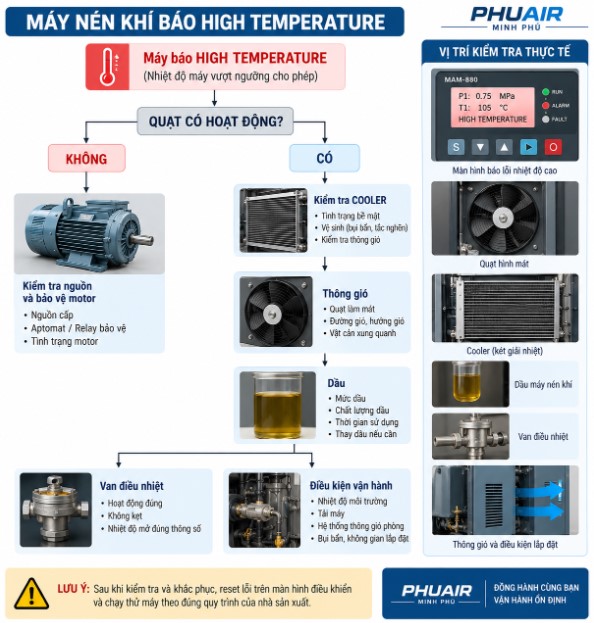
The Machine Triggers a High Temperature Alarm but the Fan Is Still Running: What Should You Check?
If the fan is still running, do not stop troubleshooting at the fan. Continue by checking the cooler, airflow, ventilation, oil, and thermostatic valve.
Should You Continue Operating the Machine if the Cooling Fan Is Faulty?
Do not continue operating the machine if the fan is essential to the cooling system but is not functioning and the machine's temperature is beginning to rise.
In particular, do not repeatedly reset alarms, ignore temperature warnings, force the machine to keep running after the protection system has shut it down, or remove the fan while the machine is energized or other hazardous conditions remain.
General principle: Address the root cause before resetting the alarm. If the fault returns after a reset, stop resetting it repeatedly and continue troubleshooting rather than forcing the machine to restart. Doing so may cause damage or seizure of the Airend.
7. How to Prevent Cooling Fan Failures
Inspect the fan during routine maintenance – Do not wait until the machine triggers an alarm. Monitor noise, vibration, fan blade condition, motor condition, airflow, and protective devices.
Keep the cooler clean – A dirty cooler forces the cooling system to operate under less favorable conditions.
Maintain good ventilation in the compressor room – Prevent hot air from recirculating into the cooling air intake area.
Monitor temperature trends – Do not record temperatures only when the machine shuts down. A gradual increase in operating temperature compared with historical data may indicate that an inspection is needed before a major fault occurs.
Information to Prepare When Requesting Technical Support
A photo of the technical nameplate attached to the machine.
The exact temperature displayed on the controller immediately before the machine shuts down, if available.
Photos or a video showing the cooling fan and cooler in their actual condition.
Current operating hours and the date of the most recent scheduled maintenance.
The alarm code and the time when it occurred.
8. Frequently Asked Questions (FAQ)
Can a faulty screw air compressor cooling fan cause a high-temperature alarm?
It can. When the fan fails to generate sufficient cooling airflow, the system's heat-dissipation capacity decreases, and the temperature may rise to the machine's alarm threshold. However, a dirty cooler, poor ventilation, and other potential causes must also be ruled out.
Is a cooling fan that runs continuously a sign that it has failed?
A fan running continuously, combined with a high-temperature alarm or loud whistling noise, indicates that the cooling system may be experiencing a problem and should be inspected by a technician immediately. However, this does not necessarily mean the fan itself is faulty. The cooling system may be operating under excessive load because of a dirty cooler or poor ventilation.
If the air compressor fan does not rotate, does that definitely mean the motor has burned out?
No. Possible causes include a power supply issue, a protective device being activated, faulty wiring, a control circuit fault, a mechanical obstruction, or a faulty fan motor.
Why does the machine remain hot even though the fan is running?
Possible causes include a dirty cooler, insufficient airflow, a hot compressor room, hot-air recirculation, a low oil level, or another cooling system problem.
Does the cooling fan need to be cleaned?
Yes. Depending on the design, the fan and surrounding area should be kept clean to prevent dirt from affecting airflow and mechanical operation.
Should you reset Fan Motor Overload multiple times?
No. If the fan protection device repeatedly trips, the cause of the overload or fault must be identified before the machine is returned to service.
If the machine triggers a high-temperature alarm and the fan is suspected to be the cause, should you try restarting it?
Do not force the machine to restart before the root cause of the overheating has been fully resolved. Doing so may cause damage or seizure of the Airend.
9. Conclusion
A faulty screw air compressor cooling fan can cause the machine to overheat, trigger a High Temperature alarm, and even shut down automatically. Warning signs to watch for include a fan running continuously with a loud whistling noise, a fan that does not rotate, unstable fan operation, unusual noise or vibration, a Fan Motor Overload alarm, and rising machine temperature despite the system remaining operational.
However, do not conclude that the fan is faulty simply because the machine is overheating. The inspection sequence should begin with:
Alarm → Fan → Power Supply/Protection → Airflow → Cooler → Ventilation → Oil → Thermostatic Valve → Operating Conditions
If the air compressor triggers a High Temperature or Fan Motor Overload alarm, record the manufacturer, model, fault code, displayed temperature, and fan condition before resetting the alarm. This information will help the technician identify the root cause more accurately.
Need On-Site Inspection Support?
If your screw air compressor system has a cooling fan that makes excessive noise, runs continuously, fails to rotate, or triggers a high-temperature alarm, send photos of the machine's nameplate, temperature readings, and a description of the current condition to PhuAir. Our technical team can help review the data and recommend an appropriate, safe solution for your factory.