

Screw Air Compressor Will Not Load: Causes & Solutions
Article reviewed by the PhuAir Technical Department - Updated: 08/09/2026
Screw air compressor will not load is a condition in which the compressor starts and the motor continues running but does not switch to the Load state when the system requires air. As a result, the compressor does not supply sufficient compressed-air flow, and pressure may fail to increase as required.
The cause may lie in the pressure conditions, inlet valve, solenoid valve, control air line, pressure sensor, controller, or even the downstream compressed-air system.
If the Unload condition persists for an extended period, the compressor continues to consume electricity while the useful compressed-air output does not correspond to production requirements, and the system may also experience insufficient air supply.
The following article helps operators correctly identify the condition, narrow down the possible causes, and determine when technician intervention is required.
1. Quick Answer: Why Does a Screw Air Compressor Fail to Load?
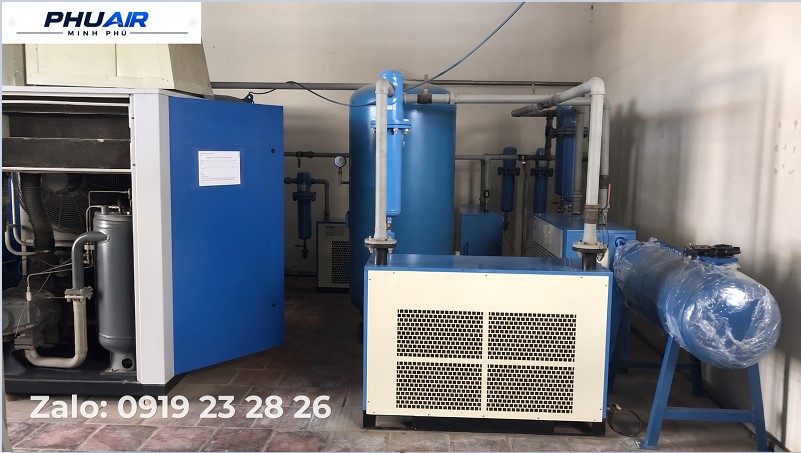
When a screw air compressor runs in Unload but does not switch to Load, the common groups of causes include:
- System pressure has not yet reached the condition required for the compressor to switch to Load.
- The Inlet Valve does not open or its actuator mechanism is stuck.
- The Load/Unload solenoid valve or control air line has a fault.
- The Pressure Sensor is sending an inaccurate signal.
- The controller does not issue a Load command due to the operating mode, an alarm, or a protection condition.
- The downstream compressed-air system has abnormal demand or leakage.
Because control designs differ between manufacturers and models, the operating sequence of the inlet valve, solenoid valve, and control signals must be cross-checked against the pneumatic/electrical schematic and technical documentation for the specific machine. Load/unload systems commonly use a control signal to actuate the solenoid valve, which in turn controls the compressor inlet valve.
⚠️ Disassembly, inspection inside the electrical cabinet, or work on valves or pressurized systems must be performed by qualified personnel after applying the energy isolation (LOTO) procedure, releasing pressure, and confirming that the machine is in a safe condition.
2. Quick Diagnosis Table: Air Compressor Will Not Load
Actual Symptom | Possible Cause | Inspection Approach |
|---|---|---|
Current pressure is still higher than the Load transition condition | The machine has not received a Load demand | Check the actual pressure and the Load/Unload parameters configured in the controller |
Machine is RUNNING but there is no indication of air being drawn in through the inlet | Inlet Valve is not opening or the actuator mechanism is not operating | Technician checks the Inlet Valve, actuator mechanism, and control air line according to the model-specific documentation |
Machine has reached the Load condition but remains in Unload | Problem with the solenoid valve or Load/Unload control circuit | Check the control signal, solenoid valve, and control air line |
Pressure value on the display is abnormal compared with the actual pressure | Problem with the Pressure Sensor, pressure sensing line, or signal transmitted to the controller | Compare with a suitable measuring device and check the signal according to the technical procedure |
Machine displays an Alarm/Fault or is not in Auto mode | Controller is locking out or has not permitted the machine to switch to Load | Check the alarm code, operating mode, and Load-permissive conditions |
Note: The table above is intended to narrow down possible causes and is not a repair procedure that can be applied identically to every screw air compressor model.
3. Distinguishing “Not Running,” “Not Loading,” and “Not Building Pressure”
These three conditions are easily confused.
Status | Symptom |
|---|---|
Compressor Not Running | The motor does not start, or the compressor stops due to a power, protection, or Emergency Stop condition |
Compressor Running Unloaded (Unload) | The motor is still running and the compressor is in the RUN state but has not switched to the loaded condition |
Compressor Not Building Pressure | The compressor has loaded and is supplying air, but pressure rises slowly, fails to reach the required level, or drops rapidly under load |
Key Point
A compressor that does not load can result in a failure to build pressure, but the two conditions are not exactly the same.
For example:
Compressor remains in RUN → UNLOAD continuously → the Load control system should be inspected.
Compressor is already LOAD but pressure continues to rise very slowly → diagnosis should be expanded to the inlet valve, filters, control valves, Airend, leakage, or system air demand.
Therefore, the Airend should not be considered weak or faulty solely because the compressor does not build pressure.
4. How Does a Screw Air Compressor Switch Between Load and Unload?
In many screw air compressors, the controller monitors system pressure and operating conditions to determine when the compressor should switch between Load and Unload states. When the Load conditions are met, the controller may activate a solenoid valve or pneumatic control mechanism, which then actuates the Inlet Valve to change the air intake condition into the compression unit.
When the pressure reaches the Unload condition, the control system returns the compressor to a reduced or non-loading state, depending on the machine design.
The specific configuration and mechanism depend on the manufacturer, model, and control method of each machine.
Therefore, if the compressor remains in Unload despite a Load demand, the inspection should follow this sequence:
Controller → Load Signal → Solenoid Valve → Control Air Line → Inlet Valve Mechanism → Air Intake Status.
5. Common Causes Why the Compressor Will Not Load
5.1. System Pressure Has Not Reached the Load Condition
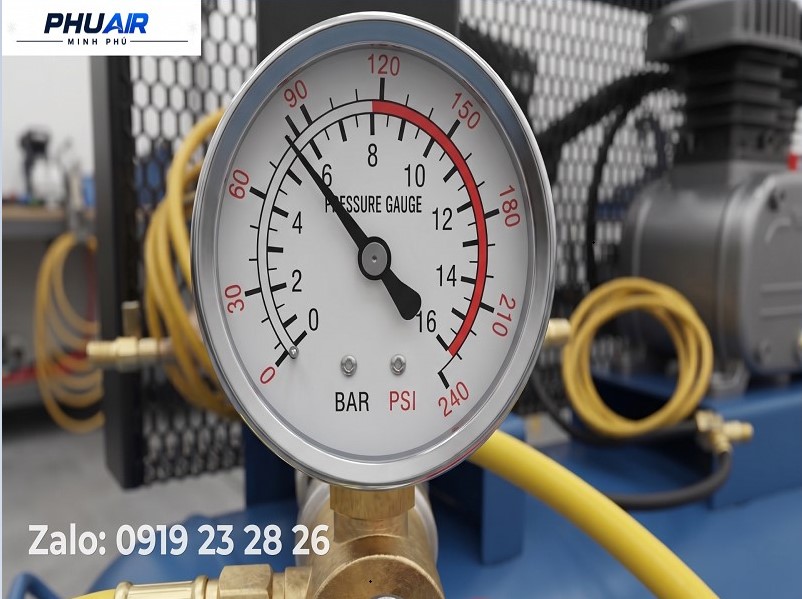
This is the first condition that should be checked.
If the actual pressure is still outside the Load transition conditions configured on the machine, the compressor remaining in Unload may be completely normal.
Check the Following:
Current pressure.
Load/Unload parameters.
Control mode.
Whether the machine is being controlled by a central control system.
Do not conclude that the machine has a fault simply because it is in the Unload state.
5.2. Inlet Valve Not Operating Correctly
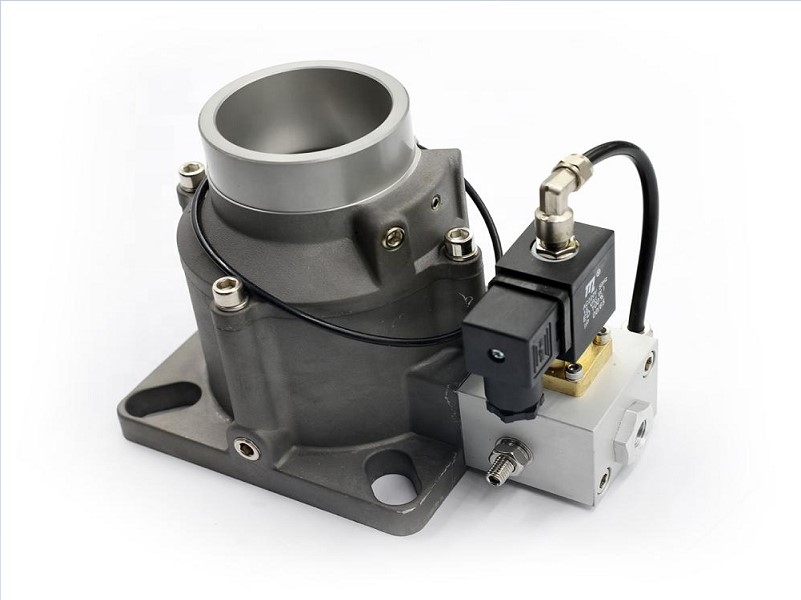
The inlet valve regulates the amount of air entering the compression unit.
If the valve is:
Stuck.
Contaminated.
Has a damaged seal or sealing mechanism.
Has a failed actuator.
Not receiving the appropriate control signal/pressure.
the compressor may fail to switch to the loaded state as designed.
Disassembly for inspection, cleaning, or replacement of the valve kit must be performed according to the technical documentation for the correct model and by a qualified technician.
5.3. Load/Unload Solenoid Valve Malfunction
The solenoid valve is one of the components that may be part of the Load/Unload control sequence. In conventional load/unload systems, the solenoid valve directs the control signal to the inlet valve to switch the compressor between loaded and unloaded states.
Common problems include:
Failed coil.
Stuck valve spool.
Contaminated valve.
Control signal not reaching the valve.
Blocked or leaking control air line.
Do not simply look at the solenoid valve and conclude that it is the cause.
It is necessary to determine whether the control signal is actually being generated and whether the downstream mechanism is responding correctly.
5.4. Pressure Sensor Reading Incorrectly
If the Pressure Sensor sends a value higher than the actual pressure, the controller may interpret the system pressure as not yet requiring loading.
For example:
Actual pressure low - sensor reports high - controller does not issue a Load command.
When a sensor is suspected, it should not be replaced immediately.
The following should also be checked:
Sensor.
Pressure sensing line.
Connector.
Signal transmitted to the controller.
Displayed pressure value compared with a suitable measuring device.
5.5. Controller Does Not Issue a Load Command
Not every failure to load originates from the mechanical system.
The controller may prevent loading due to:
Alarm/Fault.
Protection conditions not yet satisfied.
Manual operating mode.
Standby.
Remote Control.
Multi-compressor control.
Model-specific control logic.
Therefore, fault codes and the status shown on the control display are critical data when diagnosing the problem.
5.6. Control Air Line Blocked or Leaking
Some systems use control air to actuate the inlet valve or related mechanisms.
If the control air line is:
Leaking.
Blocked.
Damaged.
Contaminated with oil/water or abnormal contaminants.
Not meeting the required control conditions.
the valve may fail to change state even though the controller has issued the command.
This is an issue that should be checked by a technician when the electrical control signals are normal.
5.7. Machine Is in Manual or Standby Mode
If the machine is configured in Manual, Standby, or Remote mode, the compressor not automatically switching to Load is not necessarily a fault.
This is particularly important in systems with multiple air compressors, where a central controller may distribute the load among the compressors.
Therefore, before removing any component, check:
RUN Status → Operating Mode → Load/Unload Command → Alarm/Fault.
5.8. Abnormal Air Demand or Downstream System Condition
This situation must be distinguished from a fault within the compressor itself.
If the compressor has already entered Load but pressure still fails to reach the required level, the cause may be related to:
Increased air demand.
Pipeline leakage.
Abnormal operation of air-consuming equipment.
Blocked downstream line filter.
High pressure losses in the piping.
Compressor capacity no longer matching actual demand.
Therefore, low pressure does not necessarily mean that the Airend is faulty.
6. Air Compressor No-Load Inspection Sequence
To avoid replacing components based on assumptions, the inspection should proceed from operating data to the relevant functional assemblies.
Step 1: Record the Machine Status
Record:
RUN / STOP.
LOAD / UNLOAD.
Current pressure.
Alarm/Fault code, if any.
Auto/Manual/Remote/Standby mode.
A photo of the control display can be very useful when technical support is required.
Step 2: Check the Load Conditions
Compare the current pressure with the Load/Unload parameters configured on the machine.
If the machine has not received a Load demand, the Unload state should not be considered a fault.
Step 3: Check the Inlet Valve and Control Mechanism
If the machine has met the Load condition or received a Load command but still does not load, the technician can inspect the sequence:
Load Command → Solenoid Valve → Control Air Line → Inlet Valve Mechanism.
Any internal inspection or disassembly must be performed after isolating energy sources, releasing pressure, and confirming a safe condition in accordance with the machine's safety procedure.
Step 4: Check the Pressure Signal
Compare the value shown by the controller with a suitable pressure measuring device.
If the two values are abnormal, continue checking:
Sensor → Pressure Sensing Line → Connection → Signal → Controller.
Do not replace the sensor immediately without first identifying the cause.
Step 5: Check Alarm/Fault
Read the fault code and alarm history if the machine provides this function.
Protection faults may prevent the controller from allowing the machine to switch to Load.
The cause of the alarm must be resolved before continuing the diagnosis.
Step 6: Perform an In-Depth Mechanical Inspection if Required
If all control conditions are appropriate but the machine still does not load, the technician may expand the inspection to include:
Inlet Valve.
Solenoid Valve.
Control Air Line.
Related control valves.
Oil separator/filter assembly if it affects the control system.
Airend and other mechanical components.
These steps must be based on the manual and pneumatic/electrical schematic for the correct machine model.
7. When Should You Suspect the Airend?
The Airend should not be the first component to be identified as the cause when the compressor does not load.
The Airend should only be considered for deeper investigation when:
The machine has already entered Load.
The inlet valve is operating correctly.
The Load/Unload control system is operating normally.
There is no Pressure Sensor fault.
The related control valves show no abnormalities.
The downstream system has no abnormal demand or leakage exceeding the machine's supply capability.
However, the machine still fails to achieve the required pressure/flow performance.
At that point, the technician should perform a deeper assessment of the Airend, compression-unit performance, and related operating parameters.
This helps prevent the situation where the Airend is replaced before the root cause has been identified, resulting in unnecessary repair costs.
8. Does a Compressor Consume Electricity When Running Unloaded?
Yes.
When a screw air compressor is in the Unload state, the motor may continue running and the machine continues to consume electricity, even though the useful compressed-air output to the system is significantly lower than when the compressor is Loaded. In conventional load/unload systems, the compressor remains powered while unloaded rather than stopping immediately.
Power consumption during the Unload state is not fixed for all machines and depends on:
Motor power.
Machine design.
Control method.
Operating pressure.
Load/Unload configuration.
Speed-control technology if the machine is equipped with an inverter.
Therefore, if the compressor frequently remains Unload for extended periods, the control mode and system air demand should be reviewed to avoid unnecessary energy consumption.
9. Mistakes to Avoid When the Compressor Will Not Load
⚠️ Do Not Bypass the Solenoid Valve
Bypassing the valve to force it to operate can disrupt the control logic, disable protection functions, or create an operating condition outside the machine's design.
⚠️ Do Not Replace the Pressure Sensor Immediately When the Reading Appears Abnormal
The sensor may not be the only cause.
The pressure sensing line, connections, and signal transmitted to the controller must also be checked.
⚠️ Do Not Remove the Valve or Open the System While It Is Still Pressurized
An air compressor system may contain compressed air and high-temperature oil.
Before intervention, the technician must perform the energy isolation (LOTO), pressure release, and verification that no hazardous energy remains in accordance with the manufacturer's instructions and the site's safety requirements.
⚠️ Do Not Conclude That the Airend Is Faulty Simply Because the Compressor Does Not Build Pressure
Check Load/Unload → Inlet Valve → Control System → Pressure Sensor → Air System before considering the Airend as a suspected cause.
10. Frequently Asked Questions
Does a Screw Air Compressor Consume Electricity When Running Unloaded (Unload)?
Yes. The motor may continue consuming electricity while the compressor is in the Unload state, but the actual consumption depends on the design and control method of the individual machine.
If the compressor remains Unload for an unusually long period, the cause should be investigated rather than allowing the machine to operate continuously in this state.
Does the Compressor Failing to Load Definitely Mean the Inlet Valve Is Faulty?
No.
The inlet valve is only one of the components that can cause this condition.
Other possible causes include:
Pressure conditions.
Solenoid valve.
Control air line.
Pressure Sensor.
Controller.
Operating mode.
If the Compressor Is Running Unload but Pressure Is Still Low, Does That Mean the Compressor Is Faulty?
It cannot be concluded yet.
First determine:
Is the machine receiving a Load command?
Have the conditions for switching to Load been met?
Is the inlet valve operating?
Is the controller issuing the command?
Does the system have excessive leakage or excessive air demand?
Only after these causes have been ruled out should the compression unit be evaluated in greater depth.
Should You Remove the Inlet Valve Yourself for Inspection?
It is not recommended if you do not have the required technical expertise.
The inlet valve and the compressor's air-oil system may involve pressure, temperature, and moving mechanisms. Disassembly must be performed by a qualified technician after the machine has been isolated from energy sources and a safe condition has been confirmed.
11. Conclusion
When a screw air compressor will not load, do not immediately conclude that the inlet valve or Airend has failed.
Follow this diagnostic sequence:
Pressure & Load Conditions → Control Status → Solenoid Valve → Control Air Line → Inlet Valve → Pressure Sensor → Downstream Air System → Airend if other causes have been eliminated
This approach helps minimize replacing components based on assumptions, while reducing downtime and unnecessary repair costs.
👉 If your screw air compressor is RUNNING but will not switch to LOAD, take photos of:
The control display.
The Alarm/Fault code, if any.
The machine model and nameplate information.
The LOAD/UNLOAD status.
Send the information to PhuAir so that the technical team has a basis for narrowing down the possible causes.
Spare parts such as inlet valve kits, solenoid valves, air filters, oil filters, etc. should be identified based on the correct brand, model, and Part Number before replacement to avoid purchasing incompatible components.